It’s been a busy month at D·engage. 🐝
We’ve rolled out several updates designed to help you create more engaging campaigns, respond faster to customers, and simplify how you manage your workflows.
Here’s a closer look at what’s new.
🎡 Spin the Wheel: Make Campaigns Interactive
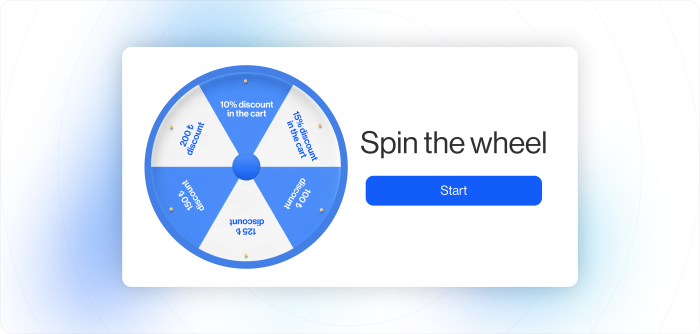
Promotions do not have to be static.
With Spin the Wheel, you can turn onsite and in-app campaigns into interactive experiences where users spin a wheel to win rewards. Instead of showing a standard discount popup, you create a moment of participation.
What you can do
- Fully customize the wheel design to match your brand
- Control reward probabilities and win limits
- Use static or dynamic coupons
- Retarget users based on the reward they won
This format naturally increases engagement time and encourages users to interact rather than ignore the message. It works especially well for seasonal promotions, welcome campaigns, and limited-time offers.
👉 Learn more about In-App setup
👉 Learn more about Onsite setup
💬 WhatsApp Auto Reply: Make Every First Interaction Count 🤝
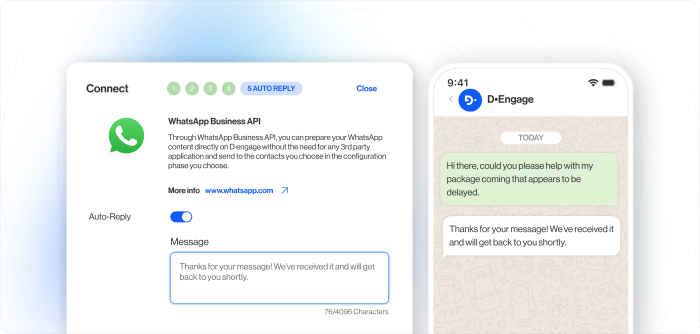
First impressions matter, especially on messaging channels.
With WhatsApp Auto Reply, you can automatically send a predefined response when a user starts a WhatsApp conversation within the 24-hour window.
What you can do
- Acknowledge users instantly
- Improve response time
- Set expectations with a clear first message
- Reduce manual follow-up
This ensures no conversation starts with silence and helps create a smoother, more professional customer experience from the first touchpoint.
👉 View WhatsApp Auto Reply documentation
🧩 Remote Segment Columns: Personalize with Live Data
Personalization becomes more powerful when it is directly connected to your data sources.
With Remote Segment Columns, you can use columns returned from a remote segment as dynamic variables inside your content.
What you can do
- Insert remote segment data into emails, WhatsApp, onsite, and in-app messages
- Personalize across channels consistently
- Preview real sample data before sending
This makes advanced personalization easier to manage without additional configuration.
👉 Explore Remote Segment Columns
📩 Gmail Annotations: Stand Out in the Promotions Tab
Email visibility matters.
With Gmail Annotations, you can enrich your promotional emails with visual elements such as images and offer highlights directly in Gmail’s Promotions tab.
What you can do
- Add visual highlights to campaigns
- Increase inbox visibility
- Improve engagement without extra cost
⚙️ Workflow Improvements: Work Faster, Stay Organized
We’ve also introduced updates to make daily execution smoother.
🎯 Multi-Segment Selection
You can now combine multiple existing segments directly inside a campaign using AND or OR logic. There is no need to create additional segments, helping you keep your structure clean and flexible.
🌍 Panel Localization with AI
Global collaboration just got easier.
You can instantly switch the D·engage interface to your preferred language, making it more comfortable for teams working across different regions.
👉 Learn about Panel Localization
That’s it for this month
These updates are designed to help you:
- Increase engagement with interactive formats
- Improve responsiveness on WhatsApp
- Personalize more effectively
- Simplify campaign workflows
- More improvements are on the way.
Stay tuned 🚀
Team D·engage